

How do I replace the battery in my card-reader?
If your card-reader displays “BATTERY LOW” or “NO POWER”, it means the device will stop working soon. You have two options:
Option 1: Replace the batteries
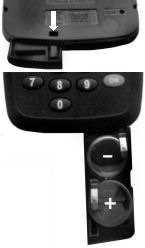
Your card-reader uses 2 x CR2032 batteries. To replace them:
- Locate the battery compartment at the bottom of the card-reader.
- Use a pen or similar tool to press down the catch on the back of the reader. This will release the battery drawer.
- Remove the old batteries and insert two new CR2032 batteries.
- Dispose of the old batteries safely according to local guidelines.
Option 2: Order a new card-reader
If you prefer to order a new card-reader:
- Log in to Online banking at www.onlinebanking.iombank.com/login (opens in a new window).
- Select 'Security' from the menu.
- Under 'Using a card-reader', choose 'Order a card-reader'.
- Select a reason from the drop-down menu.
- Click 'Confirm'.